Net worth by entity
One net worth figure, then every investment vehicle split by asset class.
What was our consolidated net worth at [month-end] in [USD], broken out by investment vehicle and asset class?
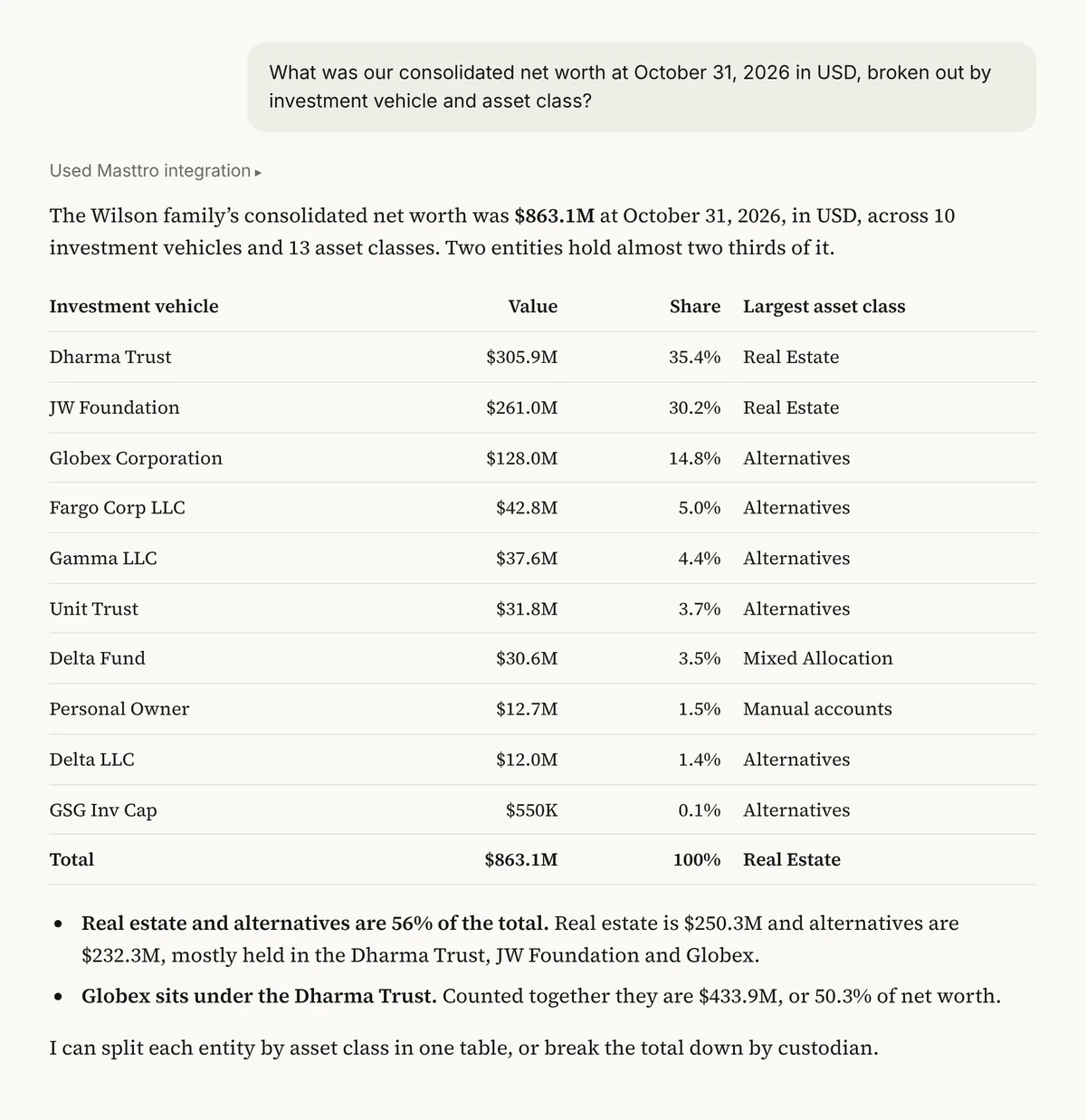
Illustrative output based on Masttro's demo family office data.
Net worth at the month-end you name, converted to your reporting currency before anything is added up.
Each entity in your Masttro structure on its own line, so the total can be traced back to who holds it.
Each vehicle broken into asset classes, which shows where a single entity is carrying most of the risk.
Replace [month-end] with the date you report on and [USD] with your reporting currency.
Why ask for net worth by entity and not just the total?
A single net worth number is the first thing a principal asks for and the least useful on its own. Most family wealth sits across trusts, holding companies and accounts, and the total hides which of them is growing, which is shrinking and which carries the concentration.
This prompt returns the total and its parts in one answer. Because Masttro already holds positions at month-end and the entity structure behind them, the split comes from the same data as the headline figure, so the two always reconcile.
Every vehicle and asset class adds back to the consolidated figure.
Positions held in other currencies are converted before they are summed.
The follow-ups break the same table down by custodian or into another currency.
Questions about this prompt
What does this prompt return?
Your consolidated net worth at the month-end you choose, then the same figure split by investment vehicle and by asset class, all in your reporting currency.
Which entities are included?
Every investment vehicle in your Masttro structure that you have permission to see. Entities outside your permissions are left out of the total.
Can I report in a currency other than USD?
Yes. Change [USD] to any reporting currency. Positions are converted to it before they are summed.
Can the AI tool change anything in Masttro?
No. The Masttro MCP connection is read-only, so the prompt can read holdings but cannot create, edit or delete a record.