Explain the structure to a new trustee
A plain-English walkthrough of the structure with a simple diagram.
Explain our ownership structure in plain English for a new trustee: who owns what, where the money sits, and which entities hold the largest assets. Include a simple diagram.
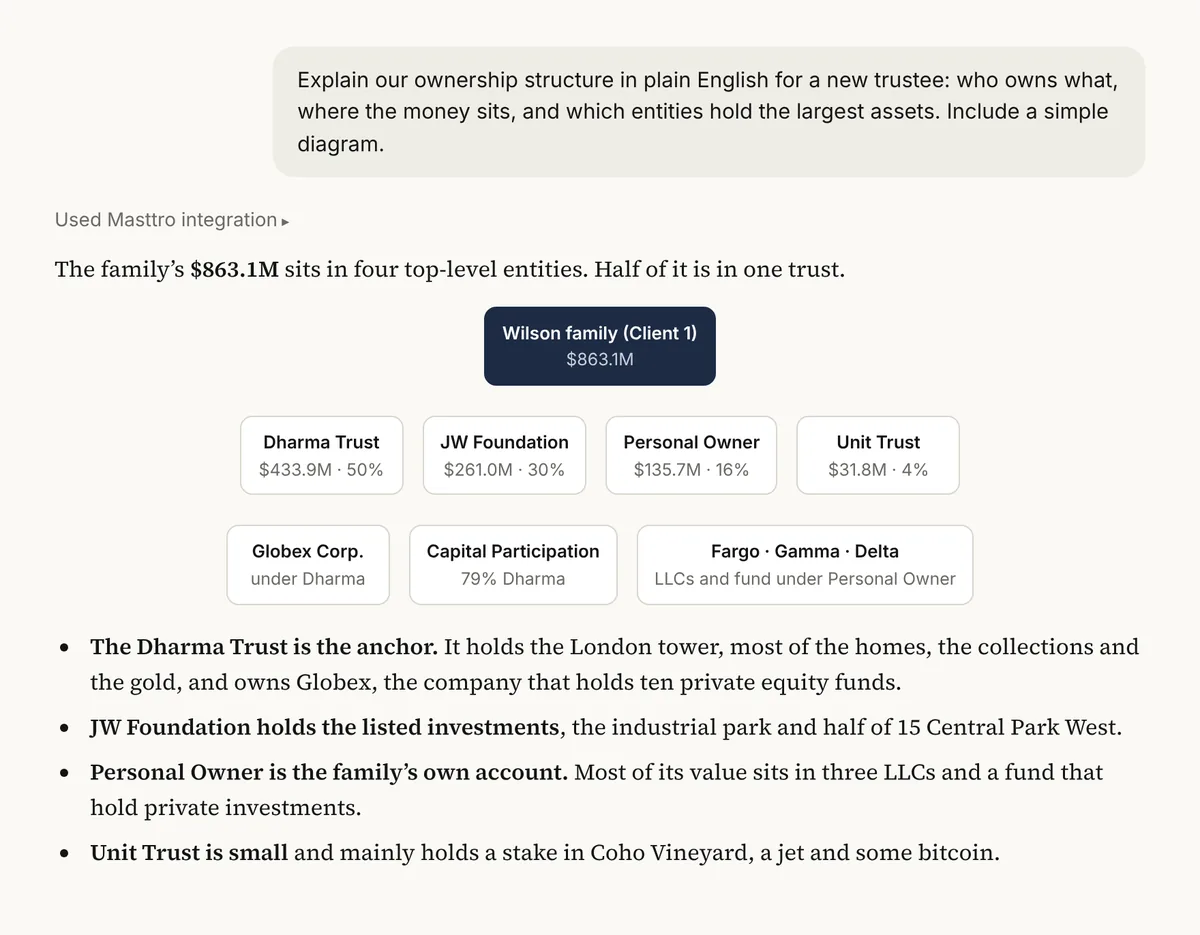
Illustrative output based on Masttro's demo family office data.
Who owns what and where the money sits, written for someone new.
Which entities carry the most value.
The structure drawn so it can be followed at a glance.
Run as written. Use the follow-ups to turn it into a memo or simplify it further.
Why have AI explain the structure to a new trustee?
New trustees and family members are often handed a structure chart full of legal names and percentages. It takes several meetings before they understand where the wealth actually sits.
This prompt uses the entity structure and holdings in Masttro to write a plain-English walkthrough with a diagram. It shortens onboarding and gives the COO a document to refine rather than write from scratch.
A readable first explanation for new trustees.
The structure and values come straight from Masttro.
Follow-ups turn it into a memo or a version for non-specialists.
Questions about this prompt
Who is this prompt for?
Anyone onboarding a new trustee, family member or adviser who needs to understand the structure quickly.
What data does it use?
The entity structure and holdings by investment vehicle in Masttro.
Can it produce a memo?
Yes. The first follow-up rewrites the answer as a one-page memo you can send.
Should I review it before sharing?
Yes. Check the wording against your legal documents before sending it outside the family office.