Concentration by asset class, sector and geography
Three concentration views, with anything over your threshold flagged.
Where are we most concentrated by asset class, sector and geography? Flag anything above [15%] of net worth.
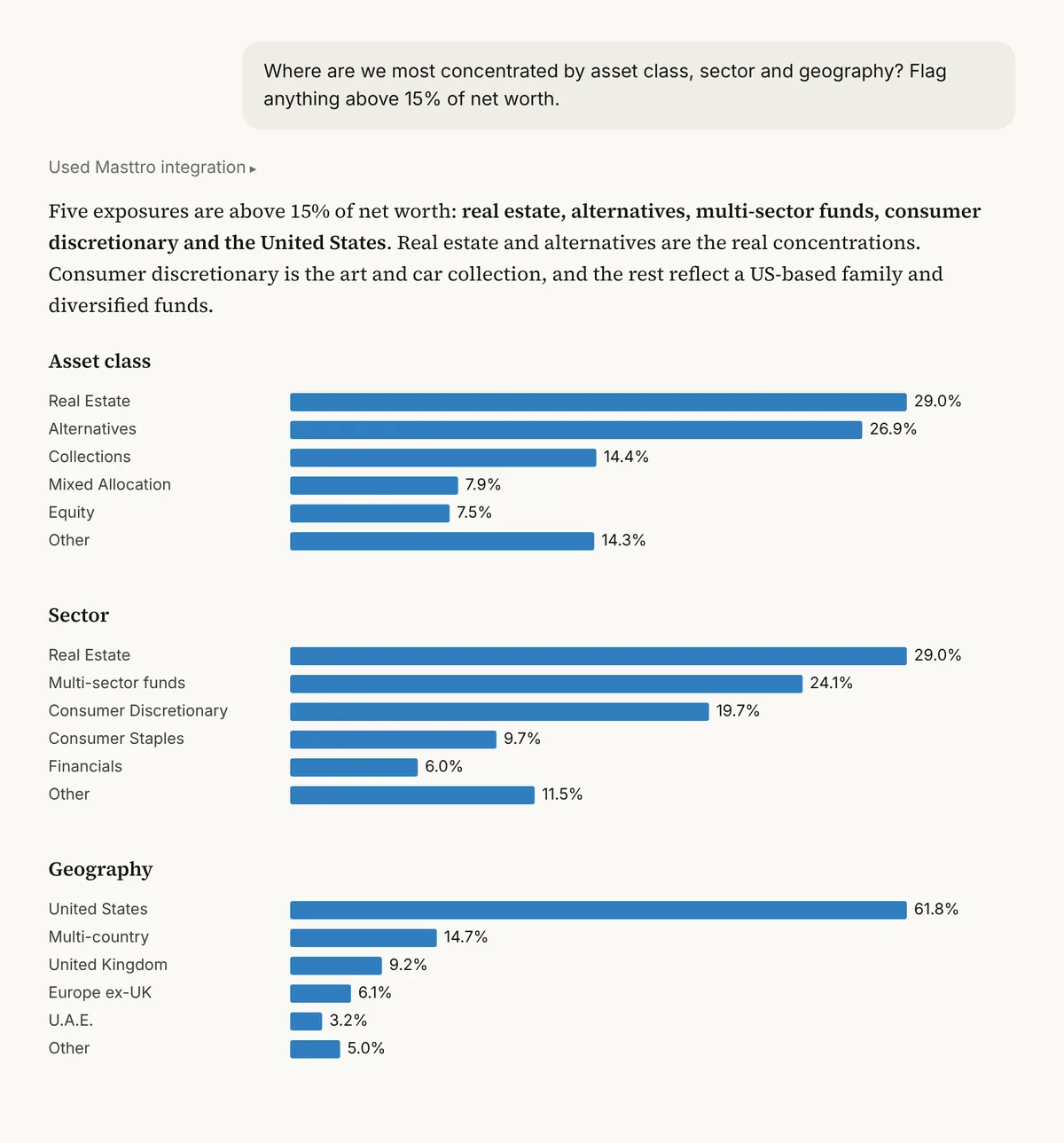
Illustrative output based on Masttro's demo family office data.
Concentration by asset class, sector and geography.
Anything above the percentage you set is flagged.
Built from the exposure recorded for every holding.
Replace [15%] with the concentration limit you use.
Why check concentration three ways?
A portfolio can look diversified by asset class and still be heavily exposed to one sector or one country. Each lens catches a different risk.
This prompt measures all three against the same threshold, so the principal sees every concentration that crosses the family's comfort level in one answer.
Sector and country risk that asset classes don't show.
Every view judged against the same limit.
A follow-up shows how the sector mix shifted over a year.
Questions about this prompt
Where does sector and geography data come from?
From the sector and geographic exposure recorded for each position in Masttro.
Can I change the threshold?
Yes. Replace [15%] with any limit.
Can I check a specific region?
Yes. A follow-up asks for total exposure to a region you name.
Can I run it for one entity?
Yes. The last follow-up limits the view to a single entity.