Check capital call notices
Each notice checked against Masttro, with mismatches flagged before payment.
I’ve attached [five] capital call notices. Extract the fund, amount, due date and wire details from each, check them against our commitments in Masttro, and flag anything that doesn’t match before we pay.
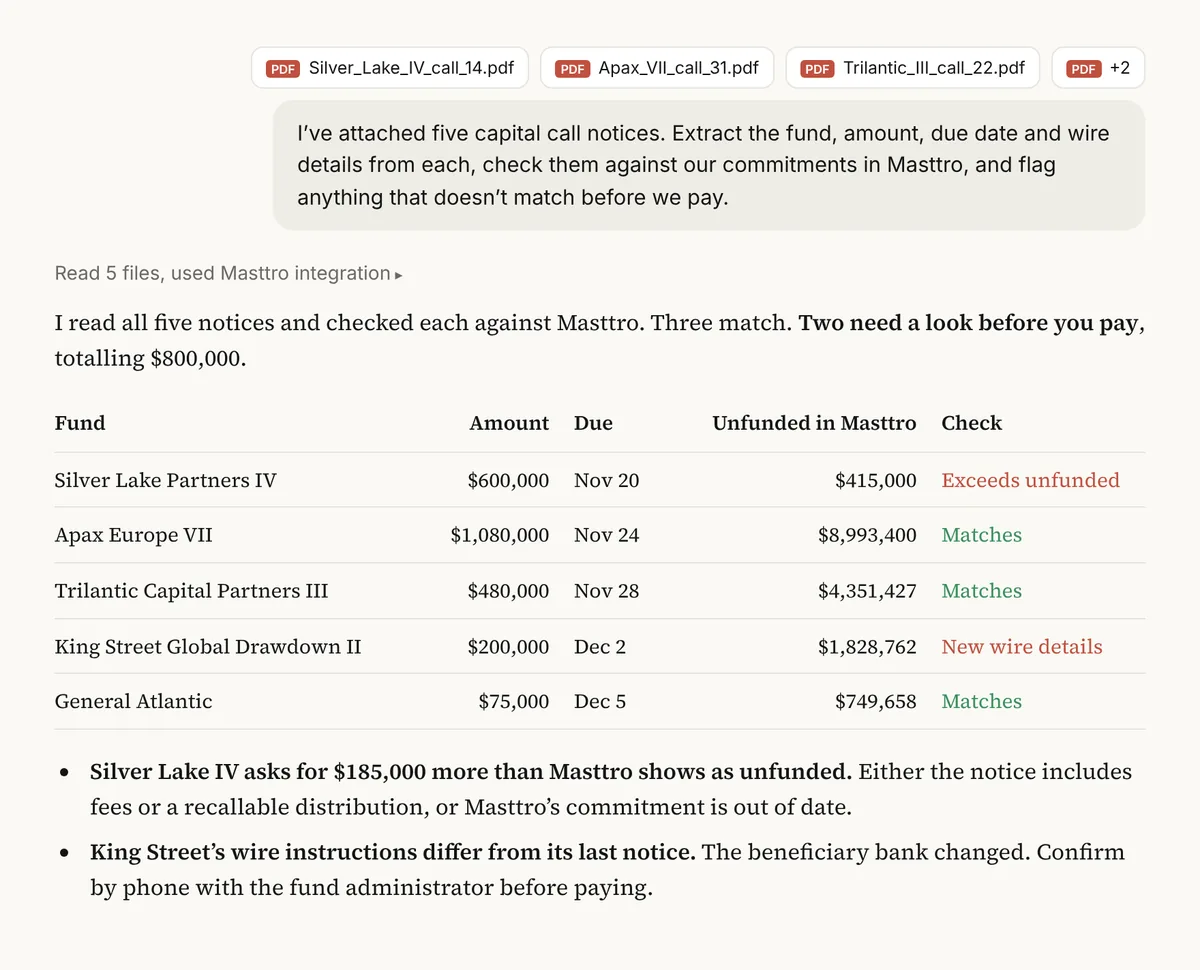
Illustrative output based on Masttro's demo family office data.
Fund, amount, due date and wire details read from each notice.
Each call compared with commitment, called and unfunded amounts.
Anything that doesn't match is called out before payment.
Attach the notices to your message and replace [five] with how many you attached.
Why check capital call notices against your records?
Capital call notices arrive by email, often as PDFs, and are paid under time pressure. A wrong amount, a call above the remaining commitment or changed wire details is exactly the kind of error that slips through.
This prompt has the AI read the notices you attach and compare them with commitments in Masttro. It is a second check before money moves, not a replacement for your payment controls.
Catches amounts that exceed unfunded commitments.
Changed bank details stand out for verification.
Check several notices in one pass.
Questions about this prompt
What do I need to attach?
The capital call notices themselves, as PDFs or images, in the same message as the prompt.
What does it compare against?
Each fund's commitment, capital called and unfunded commitment in Masttro.
Does it replace payment approval?
No. It is an extra check. Always confirm wire details directly with the fund before paying.
Can it draft a query to the fund?
Yes. The first follow-up drafts a note about any difference it finds.