Review across the families you serve
The families with the biggest losses and the heaviest alternatives exposure, in one view.
Across all the families we serve, which had the largest drawdown [last month], and which have more than [30%] of net worth in alternatives?
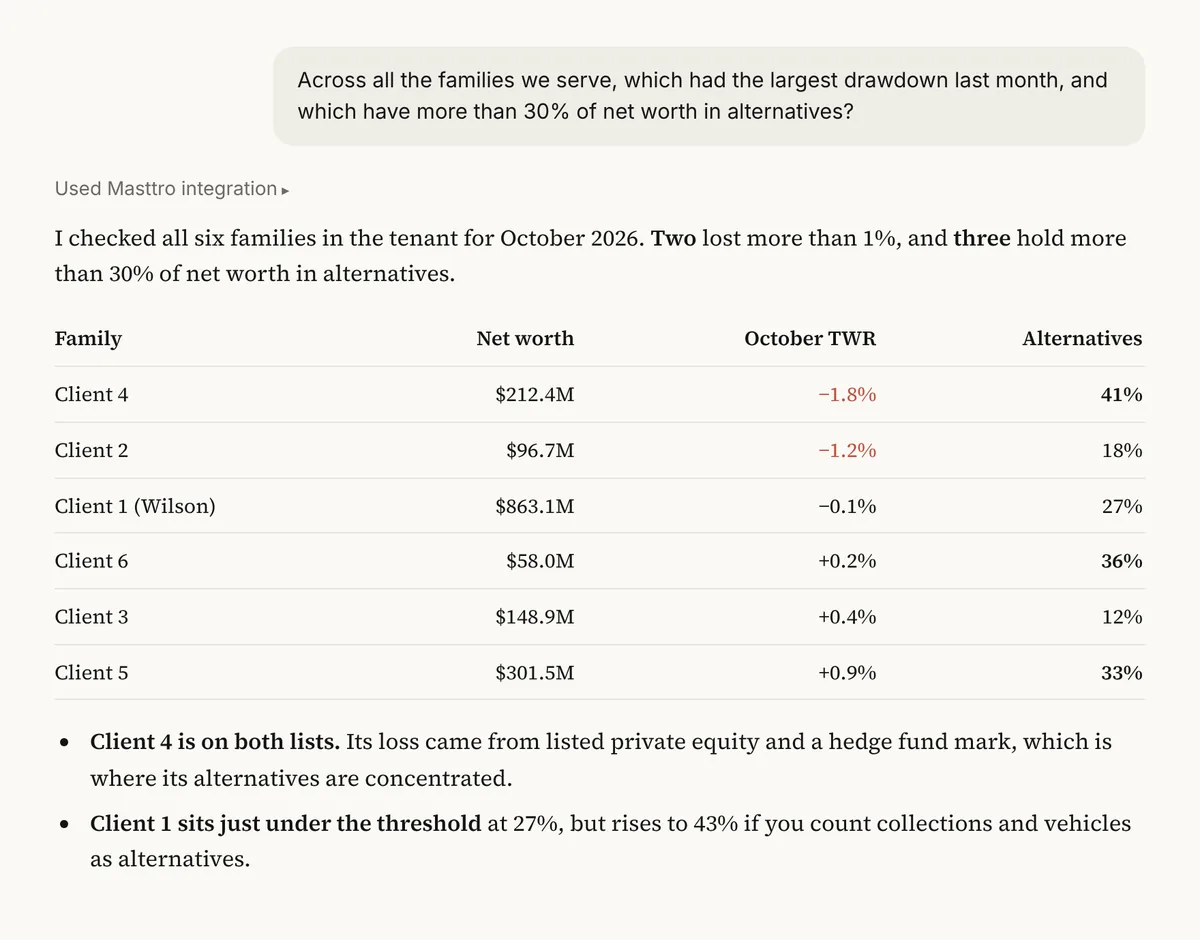
Illustrative output based on Masttro's demo family office data.
The families in your book with the biggest losses last month.
Families above your alternatives threshold, flagged in the same view.
Every client in your Masttro tenant, without opening each one.
Replace [last month] with the period and [30%] with your alternatives threshold.
Why review the whole book at once?
Advisors and multi-family offices often learn about a client's bad month when the client calls. Scanning every family on the same measures means the call can go the other way.
This prompt reads month-to-date returns and asset-class holdings for every client in your tenant and returns the ones that need attention first. It is a triage list, not a report.
Find the families to call before they call you.
Recent losses and liquidity exposure in one answer.
Only clients you are permitted to see are included.
Questions about this prompt
Who is this prompt for?
Multi-family offices, advisors and private banks that manage several families in one Masttro tenant.
Which clients are included?
Every client in your Masttro tenant that your permissions let you see.
Can I change the thresholds?
Yes. Replace [30%] and [last month] with the limits and period you use.
Can I total assets across the book?
Yes. The first follow-up totals assets across every family.